Query Fan-Out for SEO: Turn AI Searches Into a Content Plan
One question can lead to several AI searches. Here’s how to find those searches and use them to decide what your pages should cover next.
On this pageShow
- What is query fan-out?
- Where to find AI search queries
- Does your prompt need a price, location or other constraints?
- Capture queries in Claude
- 1. Enter the question in a fresh chat
- 2. Enable web search
- 3. Submit the question and wait for the search to finish
- 4. Expand the search activity
- 5. Inspect the sources for an individual query
- Capture queries in Perplexity
- 1. Submit the question with Search selected
- 2. Open the completed activity
- 3. Expand each search step
- Capture queries in ChatGPT
- 1. Prepare the question in a fresh chat
- 2. Record network activity in Chrome DevTools
- 3. Submit the question and wait for completion
- 4. Find the query metadata in the response
- 5. Read the queries array
- What happens with a broader prompt?
- Claude: one exposed search
- Perplexity: the original question and three rewrites
- A non-product example: investigating a traffic drop
- Claude's diagnostic searches
- Perplexity's diagnostic searches
- Turn the searches into questions your page can answer
- When to add a section or write a new page
- Update an espresso-machine comparison
- Compare platforms and give Shopify users a setup guide
- Give readers an order of checks for a traffic drop
- Choose what to change first
Ask ChatGPT which ecommerce platform to use for an Arabic storefront and it may run separate searches for themes, local payment options and language URLs. If your comparison already explains translation but barely covers payments, those searches give you a specific section to review.
This guide shows where to find the actual search text in Claude, Perplexity and ChatGPT, and how to use it to decide what to add to an existing page or when to write a new one.
#What is query fan-out?
Query fan-out is when a system turns one question into several related searches. Google says AI Overviews and AI Mode may use this technique. ChatGPT describes rewriting prompts into one or more targeted searches and sometimes searching again after reviewing results. Google’s documentation · OpenAI’s documentation
For SEO research, copy the exact searches you can see. They show what the tool looked up in that chat. The visible list may cover only part of its research.
#Where to find AI search queries
- Claude. Open Searched the web above the answer. The query text appears immediately. Open an individual query only if you want its source links.
- Perplexity. Open Finished above the answer, then expand each search step. Copy the lines marked with a magnifying glass. The source links sit below them.
- ChatGPT. Open Network in Chrome DevTools and search the data Chrome loaded for the saved chat. The walkthrough shows exactly where to look and requires no coding.
The prompt is the question you type. A search query is the wording used to look something up on the web, such as best compact espresso machine UK under £400 2026. A source is a page that appears in the search results or is cited in the answer, such as a product review. One query can return many sources.
Claude and Perplexity are the easiest places to start because the searches appear in the conversation itself. If you see evidence of web search and can’t find the query text, record it as “search observed, query text unavailable.”
#Does your prompt need a price, location or other constraints?
No. Start with a question your audience would actually ask. A short buying question works as a starting point:
I want to buy a compact espresso machine for my kitchen. My budget is £400.
The buyer asks for a compact machine with £400 to spend. They leave the country, brands and features open, so you can see which details come up in the searches. To see the web searches, turn on web search where available and add “Search the web and cite your sources.”
Include details that matter to your readers. The longer prompt below asks about dimensions, milk steaming and UK repair support, so expect those topics to come up. Look for more specific questions within those topics too. A search about spare parts, for example, gives you something concrete to check before writing about repairs.
#Capture queries in Claude
In this test, the buyer already owns a grinder and wants to compare machines on size, milk steaming and UK repair support.
I want to buy a compact espresso machine for a small kitchen in the UK, with a budget of £400. I already own a grinder. Compare current options, including milk steaming, dimensions, and repair support in the UK. Search the web and cite your sources.
#1. Enter the question in a fresh chat
Type the question in a new Claude chat. Check the web search setting before sending it.
#2. Enable web search
Click + beside the message box. In the menu, check that Web search has a tick beside it.
#3. Submit the question and wait for the search to finish
Let Claude complete its response before reviewing the search activity.
#4. Expand the search activity
Find Searched the web above the completed response.
Click Searched the web once. The expanded panel shows all seven query labels in this example. Copy the text from those labels.
The searches narrowed from an initial shortlist to specific models and repair options. Here are four of the seven queries.
best compact espresso machine UK under £400 2026Sage Bambino Plus dimensions price UK steam wand specificationsSage Appliances UK warranty espresso machine repair service spare partsGaggia Classic UK repair service spare parts warranty Gaggia Direct
#5. Inspect the sources for an individual query
This step is optional. Click an individual query to see the pages Claude found for that search. If you want to review those pages later, save their links alongside the query text.
#Capture queries in Perplexity
I used the same detailed espresso-machine question in Perplexity.
#1. Submit the question with Search selected
Start a new conversation, type the question, and select Search in the message box before sending it.
#2. Open the completed activity
Once the response finishes, click Finished above the answer. The label in this example was Finished 3s.
#3. Expand each search step
Under Finished, click each search step you want to inspect. For example, open Searching the web, then open Searching UK prices, dimensions, and repair support separately. To see every query in the panel, open all the search steps.
Copy the lines beside the magnifying-glass icons. Click + more only if you want additional source links. In this example, the first step displayed the original prompt and the next two showed six rewritten searches.
Here are three of the rewrites.
Sage Bambino UK price £400 repair service UK warrantyDe'Longhi Dedica Maestro Plus UK price dimensions steam wand warranty repair UKRancilio Silvia UK price dimensions repair UK espresso machine
#Capture queries in ChatGPT
In these tests, Chrome loaded ChatGPT’s query text as part of the saved conversation data. The espresso question exposed one distinct query. The ecommerce question below exposed ten.
I run a UK ecommerce store with 2,000 products and want to launch Arabic storefronts for Saudi Arabia and the UAE. Compare Shopify Markets, WooCommerce with WPML, and BigCommerce as of today. Check Arabic and RTL theme support, hreflang and Arabic URL handling, local payment gateways including mada, Apple Pay, Tabby and Tamara, country-specific pricing and currencies, and platform and app costs for a small team. Search the web using current official documentation where possible, flag unsupported capabilities, and recommend whether to stay on Shopify or migrate. Cite sources for each area of the comparison.
#1. Prepare the question in a fresh chat
Type the question and leave it unsent while you set up DevTools. I used automatic mode with Think off.
#2. Record network activity in Chrome DevTools
In Chrome on Mac, open View → Developer → Developer Tools and select the Network tab. Check that the record button is red, then click Clear beside it to empty the request list. Tick Keep log (labelled Preserve log in some versions) so the requests stay visible after you reload.
#3. Submit the question and wait for completion
Send the question and wait for the answer to finish. Reload that same chat tab with Network still recording. This lets Chrome capture the request that loads the saved conversation.
#4. Find the query metadata in the response
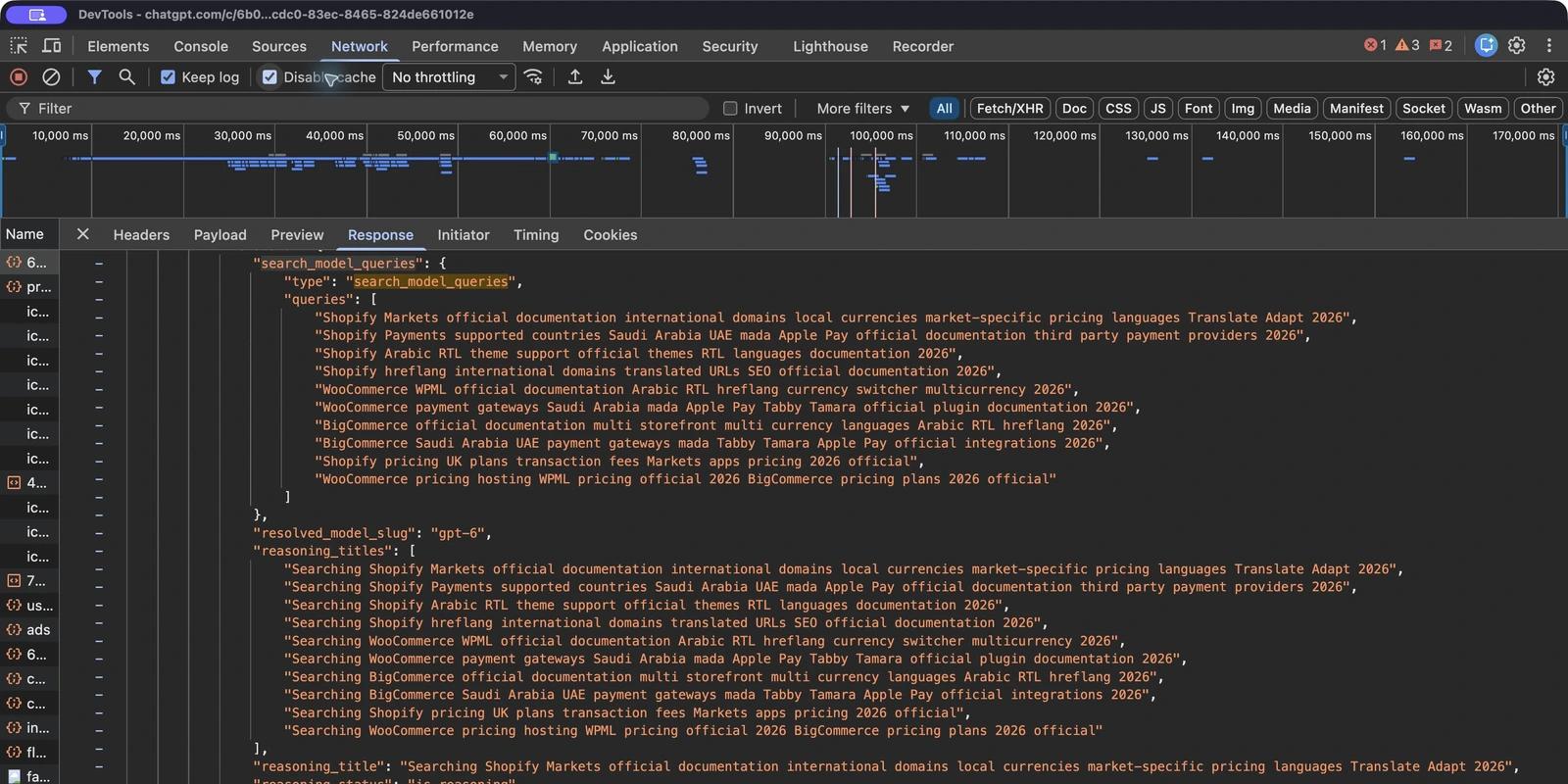
Click the magnifying glass beside the funnel icon in the Network toolbar. Type search_model_queries into the Search pane on the left and press Enter. If you searched before the requests finished loading, click the refresh icon in that pane. The Filter field on the right filters the request list. Chrome’s Network Search documentation
In the results, look for the group named with your chat’s ID, the long string at the end of the chat URL. Expand that group if needed and click the highlighted match. Skip the .js file at the top of this example.
#5. Read the queries array
Select Response. Inside metadata, find search_model_queries, then look for queries. Copy the quoted lines between the square brackets after queries. Each line in that list is a search string.
Here are four of the ten strings shown above.
Shopify Arabic RTL theme support official themes RTL languages documentation 2026Shopify hreflang international domains translated URLs SEO official documentation 2026WooCommerce payment gateways Saudi Arabia mada Apple Pay Tabby Tamara official plugin documentation 2026Shopify pricing UK plans transaction fees Markets apps pricing 2026 official
Count each distinct string once, even if the same response appears several times. A list with one string is a valid result. The field name and interface may change.
#What happens with a broader prompt?
In these espresso-machine tests, the shorter prompt mainly led to searches for models and prices. The detailed prompt also led to searches for dimensions, milk steaming and repairs.
I tested the shorter prompt once in a fresh Claude chat and once in a fresh Perplexity chat. Query counts can vary from run to run.
I want to buy a compact espresso machine for my kitchen. My budget is £400. Search the web and cite your sources.
#Claude: one exposed search
Claude showed one query focused on finding compact machines within budget.
best compact espresso machine under £400 UK 2026
#Perplexity: the original question and three rewrites
Perplexity showed the original question in its first search step. Under Searching for UK prices on compact espresso machines within budget, it showed three rewritten queries.
Sage Bambino SES450 UK price £400 2026De'Longhi Dedica Maestro Plus UK price 2026Sage Bambino Plus UK price £400 2026
Both platforms searched for UK results. The prompt gave the budget in pounds and left the market open. If you write for a different market, name it in a follow-up test and see how the searches change.
#A non-product example: investigating a traffic drop
The same steps work for a question about solving a problem. I tested this prompt on Claude and Perplexity.
My website traffic has dropped. How should I investigate the cause and decide what to fix first? Search the web and cite reliable sources.
#Claude's diagnostic searches
Opening Searched the web revealed three queries.
Google Search Central debugging drops in Google Search trafficGoogle Search Status Dashboard ranking incidents core update 2026Google core updates documentation what to do if traffic drops wait a week compare
Claude looked up how to diagnose a decline and check for a Google update. The last query gives you a source to consult before writing about when to compare traffic. Google’s guidance on core updates
#Perplexity's diagnostic searches
Perplexity displayed the original question in its first step. Opening Gathering reliable guidance on traffic drop diagnosis revealed three rewrites.
Google Search Central site traffic drop diagnosis manual actions security issues indexing crawl statsGoogle Analytics 4 diagnose traffic drop segments compare periods official documentationGoogle Search Status Dashboard ranking updates official
Perplexity also searched for how to compare periods and segments in GA4. Both sets of queries lean towards organic search, even though the prompt was about website traffic in general. A guide for that reader should start by showing how to identify the affected channel.
#Turn the searches into questions your page can answer
Start with the original prompt. It tells you what the person is trying to do. Then ask what each search would help them find out. Put searches that answer the same question together.
In the espresso example, Claude ran separate searches for UK warranties, repair services and spare parts for Sage and Gaggia. Both searches help answer one question. If this machine breaks, can I get it repaired in the UK? For a comparison page, that gives you one section on warranty and repairs, with an answer for each brand.
The GA4 search in the traffic-drop example helps a site owner find where traffic fell. The searches about Google updates help them decide what to investigate once they know the drop came from Google Search. Those become steps in a guide.
#When to add a section or write a new page
Add a section if it helps readers do what they came to the page to do. If they need instructions for a different task, give that task its own guide. Use an existing guide for that task if you have one.
#Update an espresso-machine comparison
Say your comparison lists prices and recommends a compact machine. Claude’s search for the Sage Bambino Plus dimensions and steam wand shows what a buyer may still need to know. Add the verified width, depth and height of each model. Explain how much room someone needs to refill the water tank or use the steam wand. In the repair section, compare warranty terms, repair options and spare parts availability. Link to the manufacturer’s warranty and service pages so buyers can check the details.
A step-by-step guide to fixing a steam wand could have its own page. It serves someone who already owns the machine and needs to fix a fault.
#Compare platforms and give Shopify users a setup guide
The retailer in the ChatGPT example is deciding whether to stay on Shopify or switch. Build the comparison around the checks they need to make before deciding.
- Arabic layout. Which themes display text and navigation right to left?
- Search visibility. What do Arabic and English URLs look like? Can the platform add hreflang tags that help search engines find the right language version?
- Payments. Which payment methods can the business offer in Saudi Arabia and the UAE?
- Pricing and costs. Can the store show different prices or currencies by country? What will the platform and apps cost to run?
A retailer who has chosen Shopify has a different task. They need to set up and check the Arabic storefront. Add those instructions to an existing Shopify localisation guide if you have one. Otherwise, write a guide that uses a working store to show how to check the right-to-left layout, the Arabic and English URLs, and their hreflang tags. Link to it from the comparison.
#Give readers an order of checks for a traffic drop
If your traffic-drop guide is a list of possible causes, turn the searches into a sequence the reader can follow.
- Find where traffic fell. In GA4, compare two periods of the same length. Find which channel lost sessions, then check which landing pages in that channel saw the biggest declines.
- Check whether Google Search clicks fell too. If organic search declined in GA4, look at Google Search clicks for the same pages and dates in Search Console. If clicks are steady, check whether your GA4 tag or consent settings changed. Google’s guide to debugging search traffic drops
- Use the timing to decide what to check next. If clicks fell after a site move, start with the affected URLs and their redirects. If the drop coincides with a reported Google Search incident or ranking update, check whether the affected pages and queries fit that explanation. Google’s guide to the Search Status Dashboard
Put these steps in the main traffic-drop guide. If matching dates, filters and landing pages across the two tools needs screenshots and a full walkthrough, put that walkthrough in a separate guide and link to it.
#Choose what to change first
Start with a missing answer that could change what a reader buys or does next. If customers regularly ask whether they can offer Tabby in Saudi Arabia and your comparison only says it supports local payments, add the specific details there first.
Run the prompt again in fresh chats to see which topics recur. Check those topics against customer questions, site search or Search Console before committing to a large update. Keep the original prompt, exact searches, tool, mode and date with your screenshots. Add a short label for the reader’s question and note which page you plan to update or write.
Screenshots captured on 21 November 2026.
Working on something similar?
I help ecommerce and retail brands grow across SEO, paid media, and CRO. Book an introductory call to talk through your project.
Discuss your project