KS

Free Chrome extension · Built by Khalid Semary

SearchScope: SEO, AEO & GEO audits inside Chrome

Inspect on-page SEO, links, structured data, language versions and search/AI crawler rules with SearchScope, a free Chrome extension by Khalid Semary.

View in the Chrome Web Store

See the submitted update in action

Actual SearchScope v2.4.0 interface. The labelled Example Company pages and results are synthetic demonstration data, not client outcomes. Images show the wide extension view; the normal workflow uses Chrome’s side panel.

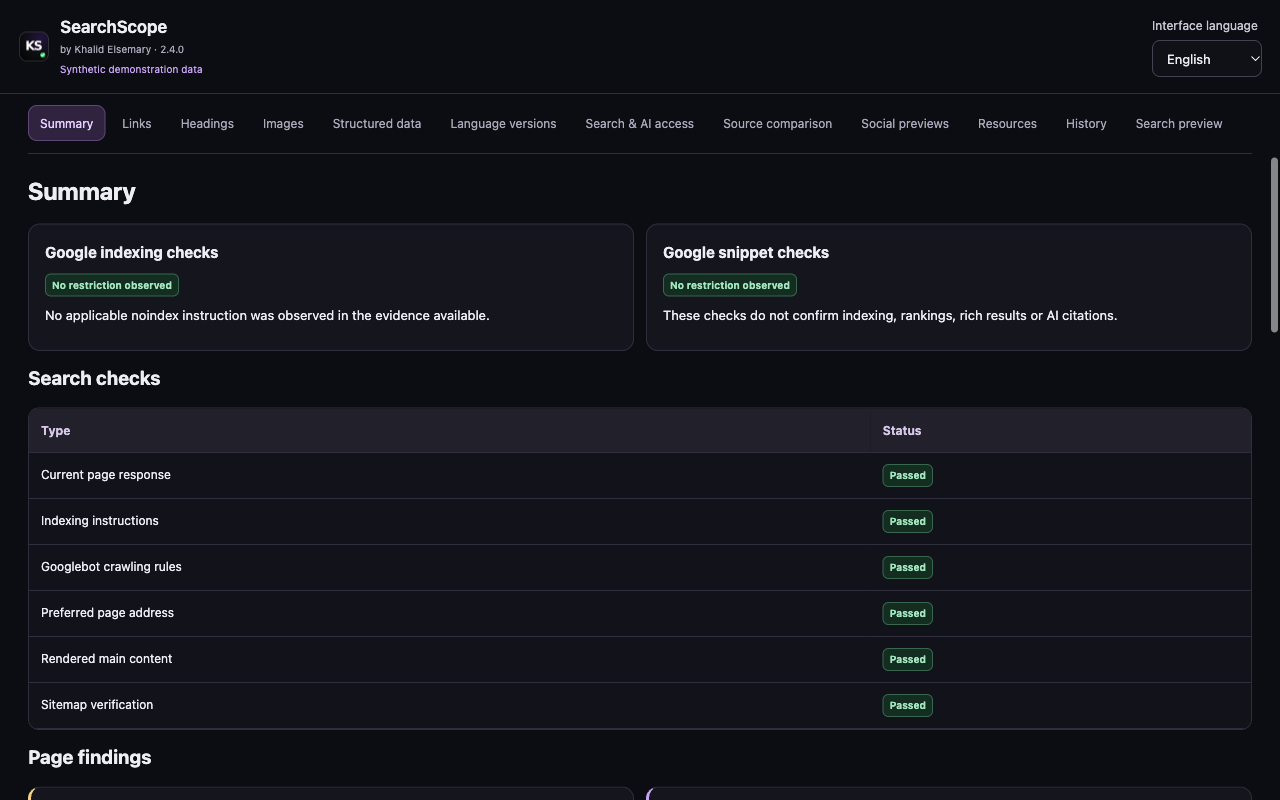
SearchScope English audit summary with synthetic Example Company data
Audit summary
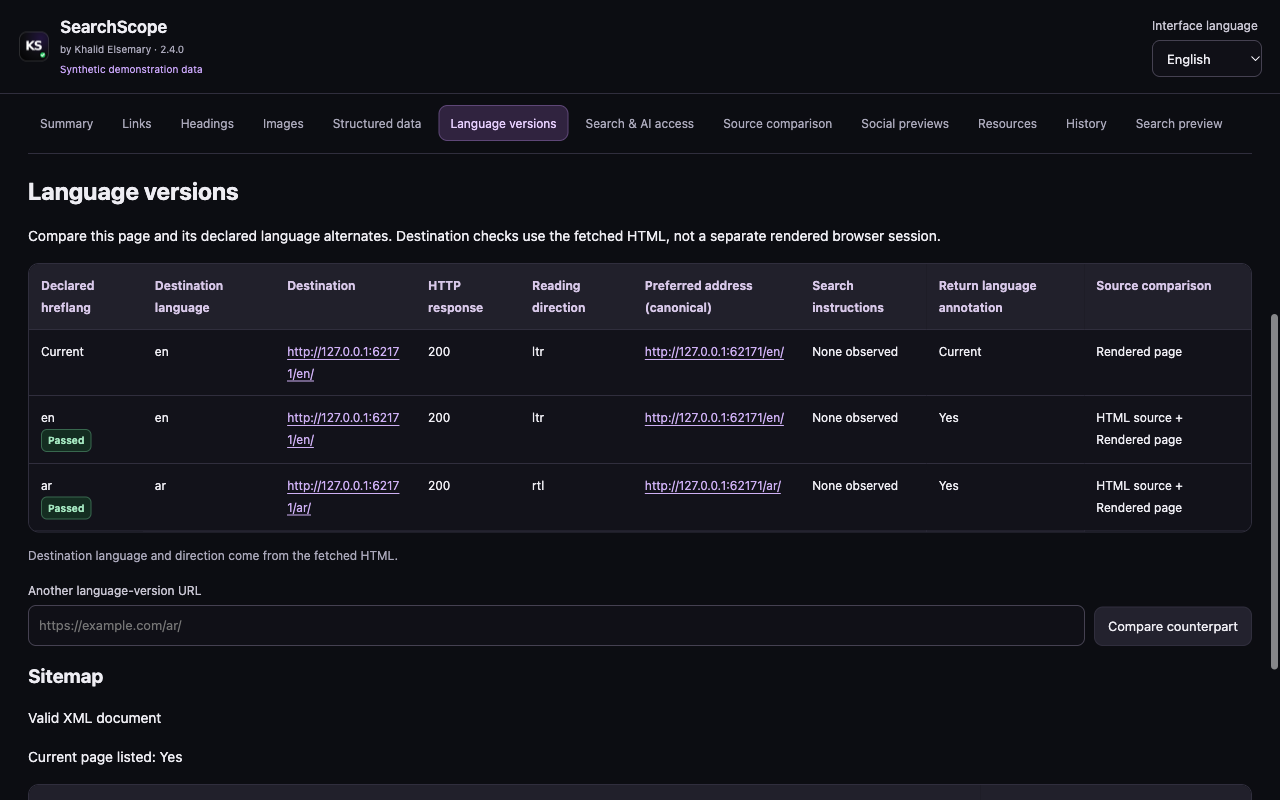
SearchScope English language-version comparison matrix
Language comparison
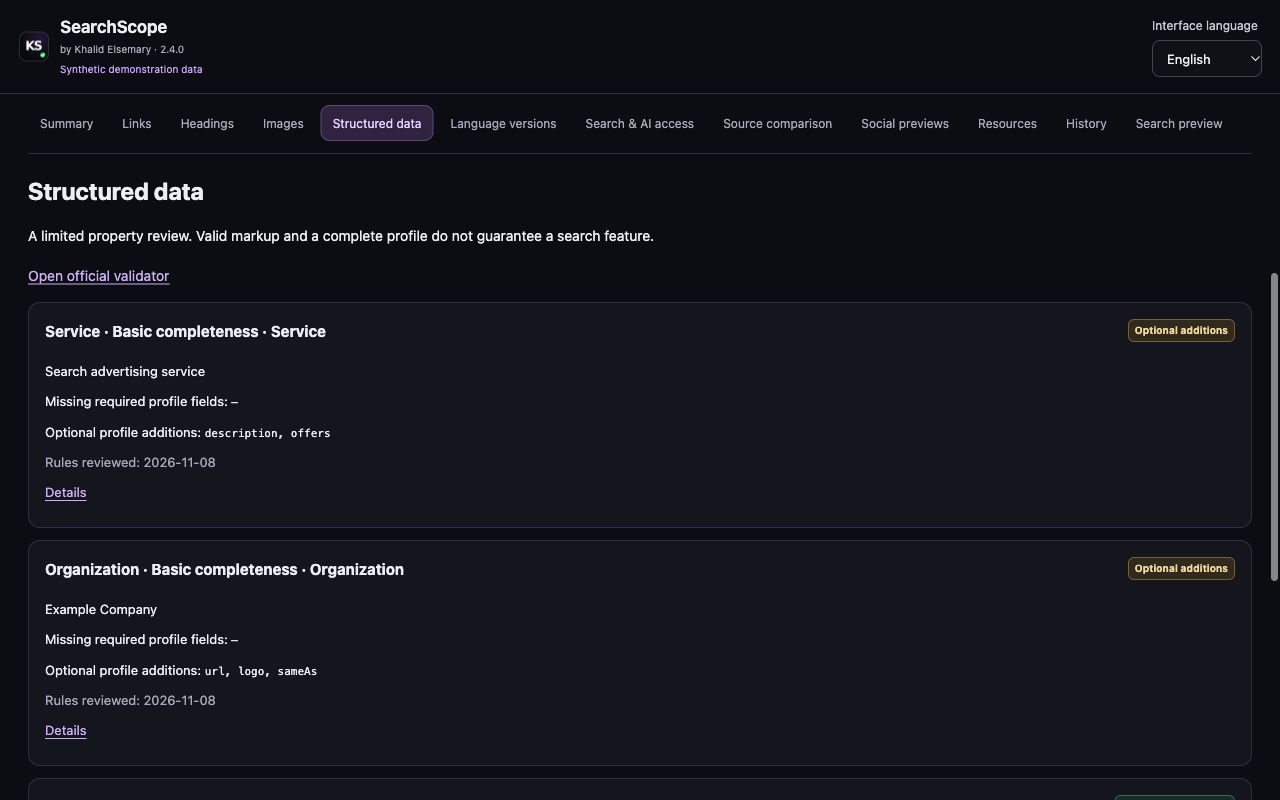
SearchScope English structured-data checks
Structured data
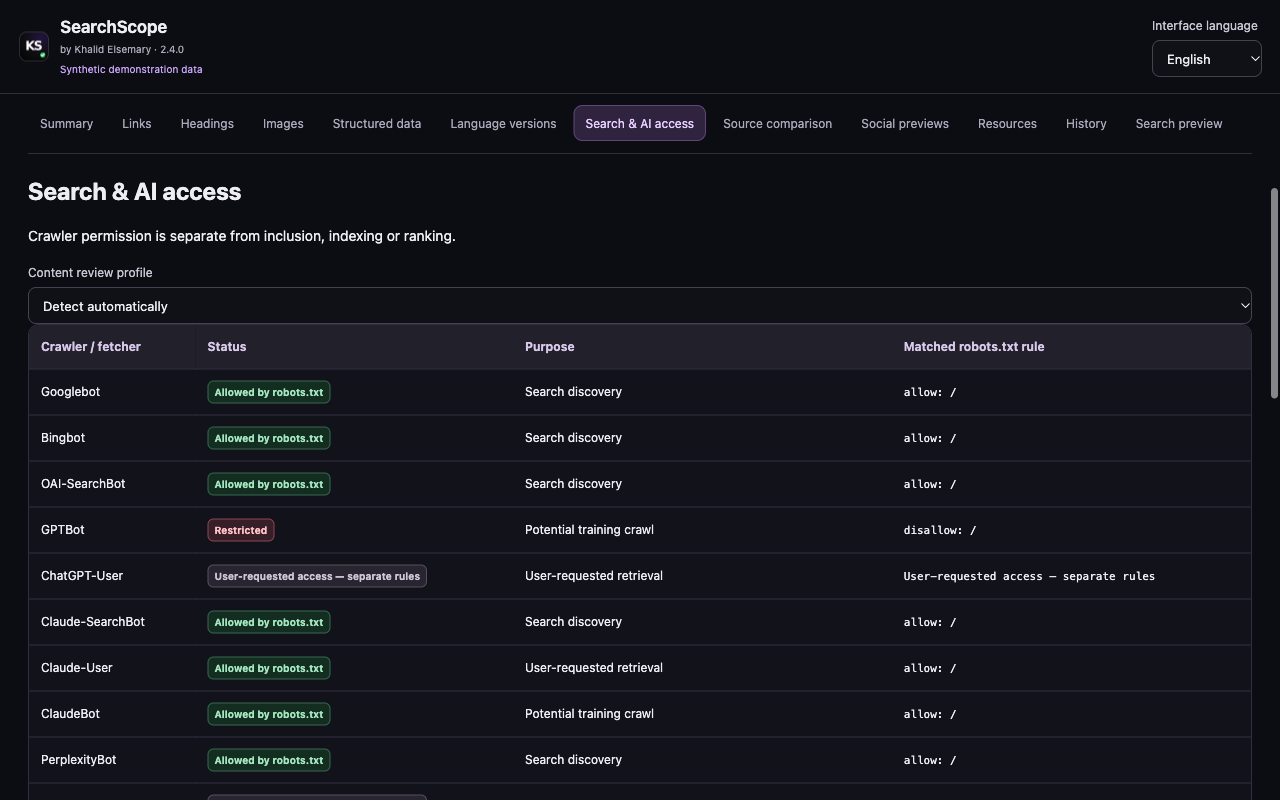
SearchScope English search and AI crawler rule checks
Search and AI crawler access
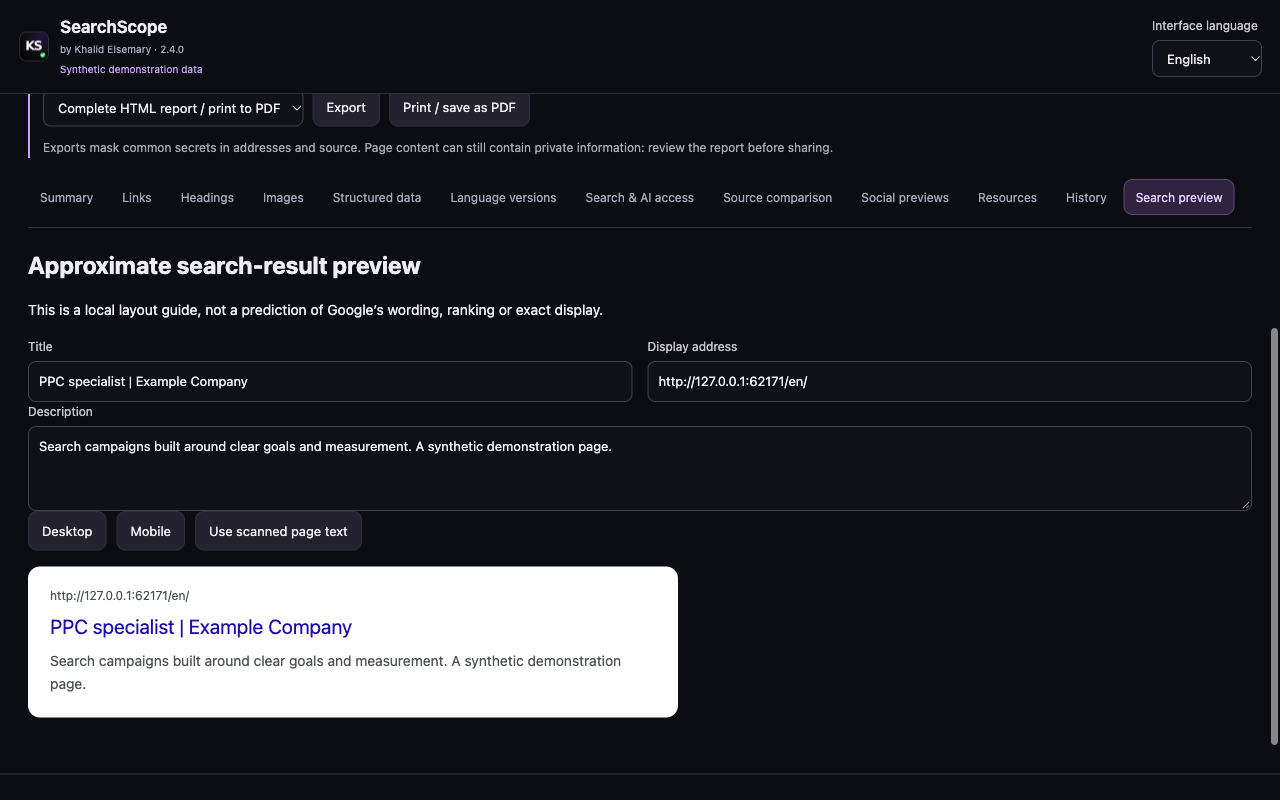
SearchScope English desktop and mobile search-snippet preview
Local search preview

Move from a page-level question to evidence you can review

Quick checks or deeper verification

Inspect titles, descriptions, canonical URLs, search instructions, headings and images from the open page. Quick check adds no audit network requests. Choose Deep scan when you need HTTP responses and destination checks.

Links and redirect paths

Review internal, subdomain and external links with their anchors, rel attributes and observed responses. Separate missing pages, access restrictions, rate limits and requests without a verified response.

Received HTML versus the rendered page

Compare important metadata, H1, word count and schema types before opening the full source comparison. Search captured code, filter script/style noise and keep common-secret masking on.

Arabic and English page versions

Compare declared language versions or a counterpart you choose. Review received HTML language, reading direction, canonical URLs, search instructions and return language links. Manual counterparts are labelled.

Structured data and entity signals

Inspect JSON-LD, Microdata and RDFa, parsing errors and supported property checks. Review Organization, Person and Brand consistency. Use official validation to investigate findings before implementation.

Search and AI crawler rules

Review robots.txt access rules and snippet instructions, separating search discovery, potential training and user-requested retrieval. These are observable technical signals, not a promise of indexing or AI citations.

Sitemaps and language destinations

Check a bounded set of XML or gzip sitemap documents and follow scoped canonical and language targets. Incomplete or unavailable evidence remains unverified instead of receiving a universal pass.

History and before/after comparisons

Reopen compact local summaries and compare metadata, language connections, structured data and link findings. Distinguish a rechecked fix from a removed link or a finding that could not be checked again.

Reports you can work with

Export English or Arabic HTML reports and print them to PDF in Chrome. Download JSON, CSV inventories and Markdown, or copy spreadsheet-ready TSV. Review page and client information before sharing.

Find the issue on the page

Locate supported links, headings, images and control findings. Highlight link findings or nofollow links and clear them afterwards. Try desktop/mobile search-snippet wording locally without editing the website.
Start with the page you want to understand

  1. Open SearchScope

    Install the available release from the Chrome Web Store and open a normal HTTP or HTTPS webpage. Launch the extension from its toolbar icon. The submitted v2.4.0 update also supports Alt+Shift+Y, configurable in Chrome.

  2. Choose the evidence you need

    In v2.4.0, begin with Quick check, then grant current-site permission for a Deep scan. Choose the hostname, the same site and its subdomains, or all linked websites. Broader website permission is optional.

  3. Review, verify and share

    Read the findings with their scope and limitations, locate affected elements, and investigate uncertain results. Export a report or compare a later scan. Use private mode when you do not want saved history.

Keep control of page data and website access

  • Audit results are processed locally and are not uploaded to Khalid Semary. No account, external AI service, remotely hosted code or extension usage analytics is required.
  • In v2.4.0, website access is offered for the current hostname or site first. Permission and scan scope remain separate. Revoke access from the extension or Chrome settings.
  • Private scans save no scan-history entries, and Incognito enforces private mode. Private source comparisons stay in the open panel. Non-private history uses bounded summaries rather than raw page HTML.
  • Deep scans contact selected websites directly. Public requests omit browser site credentials; authenticated requests use the current site session where Chrome permits it. The open page may already be logged in. Exports can still contain private information despite common-secret masking.
Read the full privacy policy

What the extension can—and cannot—verify

SearchScope is a bounded page-level review, not a whole-site crawler, backlink database, ranking tracker or accessibility certification. It does not prove Google indexing, rankings, rich results or AI citations. Received destination HTML is not an independently rendered destination test. Content-wording checks in v2.4.0 support English and Arabic; uncertain checks in other languages are not assessed. Permissions, logins and server protections can limit verification. Search previews are approximate. Google’s retired FAQ rich results are not presented as an available search feature.

Questions about SearchScope

Is SearchScope free?

Yes. SearchScope is a free Chrome extension by Khalid Semary. You do not need an account to run an audit. Optional consulting is separate from using the extension.

Does it work on Arabic websites?

SearchScope can inspect technical signals on Arabic pages. The submitted v2.4.0 update adds an Arabic interface and reports, RTL layouts, Arabic wording checks and a language-version comparison view. These features become available when the update is published.

Does it change my website?

The extension audits the page and does not publish website changes. Locate and highlight tools can temporarily mark elements in the open page; those highlights can be cleared. The local search preview changes only its preview text.

Does it send my content to an AI model?

No. The extension does not call an external AI service. You can export cleaned content or AI-review notes as Markdown, but any later sharing with another service is your choice.

How is it different from the Quick SEO Audit tool?

The website’s Quick SEO Audit checks a public URL. SearchScope runs beside the webpage open in Chrome, so you can inspect its rendered content, compare received source and review links and other signals in the browser context.

Will a good result improve my ranking?

A result describes what the selected checks could observe. It is not a ranking guarantee. Review the underlying evidence and business context before choosing changes, and use official search and structured-data tools where appropriate.

Need help turning findings into useful changes?

Share the page, the report and the problem you are trying to solve. I can help review the evidence, prioritise technical SEO work and implement improvements across Arabic and English websites.

Extension support: khalidsemary@gmail.com